Knip: Finding Ghost Code and Unused Abstractions
Introduction
Declutter trash.
When you start building a feature, maybe a user dashboard or an API integration. You create a utils/ folder with a bunch of helper functions, you export 15 TypeScript interfaces for response payloads, you install a couple of npm packages to test something out, and you write abstractions because you think, “I might need this later.”
A few weeks pass. The requirements change, you refactor the feature, or you pivot. But those helper functions, exported types, and packages are still in your repository, nobody touch/see or sniff it.
Introducing the all new Knip a powerful tool to improve your code (seriuosly im not endorsed).
What is Knip?
Knip (which comes from the Dutch word for cutting or trimming) is a CLI tool for JavaScript and TypeScript projects. Its main job is simple: find unused files, dead exports, unused types, and unneeded dependencies.
Unlike standard linters that only inspect one file at a time, Knip looks at the whole project dependency graph. It starts at your entry points, traces every import and export across your files, and tells you what is actually connected versus what is just sitting there doing nothing.
The Problem: Ghost Code and Over-Engineering
Most of us have fallen into the speculative engineering trap or this happen when we use AI/agent.
As mentioned before when you building something and then decided to write a maybe formatters.ts file with 6 methods and give export in front of all of them but it turned out only one method used outside the script. Seems trivial, but if your project growing or you keep focusing on new feature, it will piling up and violate abstraction rule.
Here is why that happens:
- TypeScript (tsc) will not warn you: TypeScript checks whether your types are valid, not whether you actually use them. If you mark a function or type with export, tsc assumes external code or another module might want it.
- Standard linters look at single files: ESLint checks for unused variables inside a file. But once you export something, a standard linter treats it as public API and stops complaining.
- Mental overhead: When you open a types file with 30 interfaces, you have to spend time figuring out which ones actually matter and which ones are leftovers from two refactors ago.
The result is ghost code: code that compiles and passes CI, but has no actual purpose.
What Knip Can Do
When you run Knip on a project, it gives you a clean list of things you can safely delete or fix:
- Unused dependencies: Packages in dependencies or devDependencies inside your package.json that are never imported anywhere in your source code.
- Unlisted dependencies: Packages you import in your code but forgot to declare in package.json (meaning your build only works because of phantom dependencies hoisted in node_modules).
- Unused exports: Functions, constants, variables, or classes that have export on them, but no other file in the project imports them.
- Unused exported types: TypeScript type aliases and interface definitions that are exported but never consumed outside their file.
- Unused files: Entire files sitting in your repository that are never reached from your entry points.
- why Knip? Because finding dead code manually across dozens of files is tedious and you will miss things. Knip builds the whole dependency graph and checks it in a few seconds.
- why not just tsc? TypeScript only validates type safety. It does not know or care whether your project actually imports an exported type.
- why does dead code matter? Less code means less cognitive load, faster builds, and fewer places for confusion when reading through the project later.
Cleaning Up: Trimming the Abstractions
Often the hardest part is not finding dead code, it is admitting that an abstraction you built was never necessary in the first place.
When you run Knip on a project that has been active for a while, you realize how much premature abstraction happened. You created layers of wrappers, helper mappers, and redundant interfaces that served no real purpose.
Deleting code is genuinely satisfying. Stripping out unused exported interfaces and leftover utility functions does not break anything, and it makes the project much easier to navigate.
These are proof of his hard work:
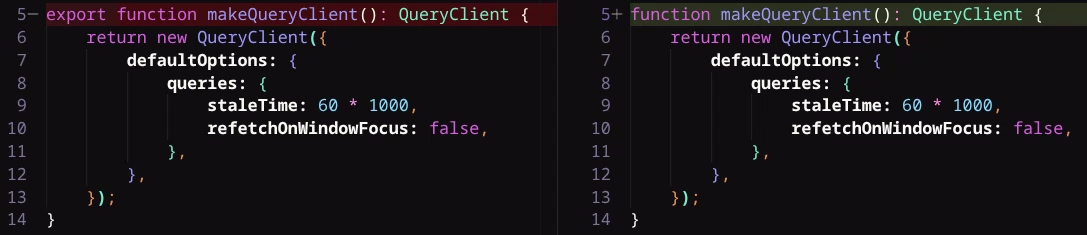
He can detect unused package too:

Installation
Setting up and using Knip is easy peasy lemon squishy. you can check out the official documentation knip.dev. It support bun, npm, pnpm, and yarn so i guess its covered almost all popular js runtime.
What I Learned
Running Knip and cleaning up unnecessary abstractions reminded me of a few good habits:
- YAGNI (You Aren’t Gonna Need It): Do not build abstractions for hypothetical future use cases. Write the simple direct version first, and only extract abstractions when duplication actually becomes a problem.
- Abstraction: Avoid giving export on every method and interface by default. Keep things private to their file until another module actually needs them.
- Deleting code is good things: Deleting some unused legacy code or placeholder is good things you dont want to make the project cluttered just because unused logic.
Final Thoughts
Every codebase collects clutter as features get added and modified. Having a tool to check your project graph every now and then is a great way to keep things lean and honest.
Thanks for reading!